
 Español

Como administrar dhcp, pppoe y ip con pcq y address-list en mikrotik
Como podemos administrar redes (dhcp, pppoe y ip) con pcq y address-list en mikrotik y mostrar pantalla de corte a Moroso, funciona con http y https.
En esta versión definimos 3 tipos de velocidad de navegación para los tres metodos de red (dhcp,pppoe y ip)
Como podemos administrar (dhcp,pppoe y ip) con pcq y address-list en Mikrotik
# 1 Definir las interface
Aqui definimos las interface de acceso de los clientes y la interfas de entrada de internet
/interface ethernet
set [ find default-name=ether1 ] comment=ISP-Entel
set [ find default-name=ether2 ] comment=DHCP arp=reply-only
set [ find default-name=ether3 ] comment=PPPoE
set [ find default-name=ether5 ] comment=IP
/interface list
add comment="Lista de WAN para redeswisp" name=Lista_WAN_redeswisp
# 2 IP Address
Aqui vamos a definimos las listas de ip para la red
/ip address
add address=192.168.1.200/24 interface=ether1 network=192.168.1.0
add address=10.10.20.1/24 interface=ether2 network=10.10.20.0
add address=192.168.10.1/24 interface=ether5 network=192.168.10.0
# 3 Server DHCP
Aqui definimos el pool y el server DHCP
/ip pool
add name=pool_dhcp ranges=10.10.20.0/24
/ip dhcp-server
add add-arp=yes address-pool=pool_dhcp allow-dual-stack-queue=no interface=ether2 lease-time=1h name=dhcp_wisp
/ip dhcp-server network
add address=10.10.20.0/24 dns-server=8.8.8.8,8.8.4.4 gateway=10.10.20.1
# 4 Server PPPoE
Aqui definimos el pool y el server PPPoE
/ip pool
add name=pppoe-pool ranges=10.10.10.0/24
/ppp profile
add local-address=10.10.10.1 name=plan5M on-down="/ip firewall address-list remove [find where address=\$\"remote-address\" list=plan5M]\
    \n" on-up="/ip firewall address-list add list=plan5M address=\$\"remote-address\" comment=\$user\
    \n" remote-address=pppoe-pool
add local-address=10.10.10.1 name=plan10M on-down="/ip firewall address-list remove [find where address=\$\"remote-address\" list=plan10M]\
    \n" on-up="/ip firewall address-list add list=plan10M address=\$\"remote-address\" comment=\$user\
    \n" remote-address=pppoe-pool
add local-address=10.10.10.1 name=plan15M on-down="/ip firewall address-list remove [find where address=\$\"remote-address\" list=plan15M]\
    \n" on-up="/ip firewall address-list add list=plan15M address=\$\"remote-address\" comment=\$user\
    \n" remote-address=pppoe-pool
/interface pppoe-server server
add interface=ether3 default-profile=plan5M service-name=pppoe one-session-per-host=yes
# 5 QUEUE TYPES
Aqui definimos los queue types
/queue type
add name=pcq-5M-up kind=pcq pcq-rate=5M pcq-classifier=src-address
add name=pcq-5M-down kind=pcq pcq-rate=5M pcq-classifier=dst-address
add name=pcq-10M-up kind=pcq pcq-rate=10M pcq-classifier=src-address
add name=pcq-10M-down kind=pcq pcq-rate=10M pcq-classifier=dst-address
add name=pcq-15M-up kind=pcq pcq-rate=15M pcq-classifier=src-address
add name=pcq-15M-down kind=pcq pcq-rate=15M pcq-classifier=dst-address
# 6 QUEUE TREE
Aqui definimos los queue tree
/queue tree
add name=TOTAL-UP parent=ether1 max-limit=50M
add name=TOTAL-DOWN parent=global max-limit=50M
add name=5M-UP parent=TOTAL-UP packet-mark=5M-up queue=pcq-5M-up
add name=5M-DOWN parent=TOTAL-DOWN packet-mark=5M-down queue=pcq-5M-down
add name=10M-UP parent=TOTAL-UP packet-mark=10M-up queue=pcq-10M-up
add name=10M-DOWN parent=TOTAL-DOWN packet-mark=10M-down queue=pcq-10M-down
add name=15M-UP parent=TOTAL-UP packet-mark=15M-up queue=pcq-15M-up
add name=15M-DOWN parent=TOTAL-DOWN packet-mark=15M-down queue=pcq-15M-down
# 7 IP MANGLE
Aqui definimos el marcado de paquete
/ip firewall mangle
add chain=forward src-address-list=plan5M action=mark-packet new-packet-mark=5M-up passthrough=no
add chain=forward dst-address-list=plan5M action=mark-packet new-packet-mark=5M-down passthrough=no
add chain=forward src-address-list=plan10M action=mark-packet new-packet-mark=10M-up passthrough=no
add chain=forward dst-address-list=plan10M action=mark-packet new-packet-mark=10M-down passthrough=no
add chain=forward src-address-list=plan15M action=mark-packet new-packet-mark=15M-up passthrough=no
add chain=forward dst-address-list=plan15M action=mark-packet new-packet-mark=15M-down passthrough=no
# 8 IP FIREWALL FILTER
Aqui definimos las reglas de filtro de conección
/ip firewall address-list
add address=130.185.118.102 list=servers_redeswisp
add address=demoweb.redeswisp.com list=servers_redeswisp
add address=stripe.com list=server_stripe
add address=js.stripe.com list=server_stripe
add address=api.stripe.com list=server_stripe
add address=checkout.stripe.com list=server_stripe
add address=192.168.10.10 list=plan5M
/ip firewall filter
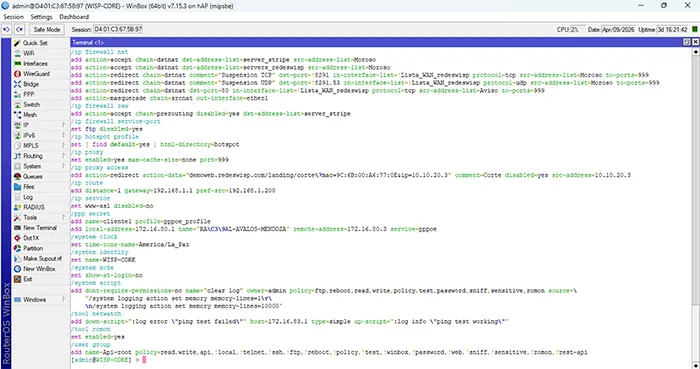
add action=accept chain=forward comment="Permitir Stripe" dst-address-list=server_stripe dst-port=80,443 protocol=tcp src-address-list=Moroso
add action=accept chain=forward comment="Permitir Portal" dst-address-list=servers_redeswisp dst-port=80,443 protocol=tcp src-address-list=Moroso
add action=drop chain=input comment="Bloquear WebProxy WAN" dst-port=999 in-interface-list=Lista_WAN_redeswisp protocol=tcp
add action=reject chain=forward comment="Bloquear HTTPS Morosos" dst-address-list=!servers_redeswisp,!server_stripe dst-port=443 protocol=tcp reject-with=tcp-reset \
    src-address-list=Moroso
add action=drop chain=forward comment="Bloquear QUIC" dst-port=443 protocol=udp src-address-list=Moroso
# 9 IP FIREWALL NAT
Aqui definimos el comportamiento de la conección
/ip firewall nat
add action=accept chain=dstnat dst-address-list=server_stripe src-address-list=Moroso
add action=accept chain=dstnat dst-address-list=servers_redeswisp src-address-list=Moroso
add action=redirect chain=dstnat comment="Suspension TCP" dst-port=!8291 in-interface-list=!Lista_WAN_redeswisp protocol=tcp src-address-list=Moroso to-ports=999
add action=redirect chain=dstnat comment="Suspension UDP" dst-port=!8291,53 in-interface-list=!Lista_WAN_redeswisp protocol=udp src-address-list=Moroso to-ports=999
add action=redirect chain=dstnat dst-port=80 in-interface-list=!Lista_WAN_redeswisp protocol=tcp src-address-list=Aviso to-ports=999
add action=masquerade chain=srcnat out-interface=ether1
# 10 CONECTAR CLIENTES
Aqui agregamos las ip de los clientes en address-list ya sea como activo o moroso
/ip dhcp-server lease
add address=10.10.20.3 allow-dual-stack-queue=no comment="Raul nap" disabled=yes mac-address=9C:6B:00:A6:77:0E server=dhcp_wisp use-src-mac=yes
/ppp secret
add name=benja profile=plan5M remote-address=10.10.10.3 service=pppoe
/ip firewall address-list
add address=192.168.10.2 list=plan5M
add address=10.10.20.3 list=plan10M
add address=10.10.10.3 list=plan10M
add address=10.10.20.6 comment=Corte list=Moroso
add address=10.10.10.2 comment=Corte list=Moroso
# 11 SCRIPT DHCP A LISTA
Este script va a agregar a todos los que esten en lease a address-list con su plan
/system script
add dont-require-permissions=no name=dhcp-to-list owner=admin policy=ftp,reboot,read,write,policy,test,password,sniff,sensitive,romon source= "\r\
    \n:foreach i in=[/ip dhcp-server lease find] do={\r\
    \n  :local ip [/ip dhcp-server lease get \$i address]\r\
    \n  :local comment [/ip dhcp-server lease get \$i comment]\r\
    \n\r\
    \n  :if (\$comment=\"plan5M\") do={\r\
    \n    /ip firewall address-list add list=plan5M address=\$ip comment=\"DHCP\"\r\
    \n  }\r\
    \n  :if (\$comment=\"plan10M\") do={\r\
    \n    /ip firewall address-list add list=plan10M address=\$ip comment=\"DHCP\"\r\
    \n  }\r\
    \n}\r\
    \n"
# 12 TAREA EJECUTAR DHCP
Esta tarea ejecutara cada 2 minutos para enviar a los clientes de dhcp a address-list
/system scheduler
add name=dhcplist interval=00:02:00 on-event="/system script run dhcp-to-list" start-time=startup comment="Ejecuta script cada 2 minutos"
Nota importante
En el tipo de red DHCP el script agregara automaticamente a address-list
En el tipo de red PPPoE el profile agregara automaticamente a address-list al conectar y lo elimina al desconectarce
En el tipo de red IP ay que agregar de forma manual a address-list